$ cd $AGILLA

$ java agilla.AgentInjector -comm COM1:57600
Note that you can add a '-d' to the end of the command that launches the AgentInjector to enable debug output. Also, adjust the serial port and baud rate to match your specific platform.
If launched correctly, the following AgentInjector GUI will appear:
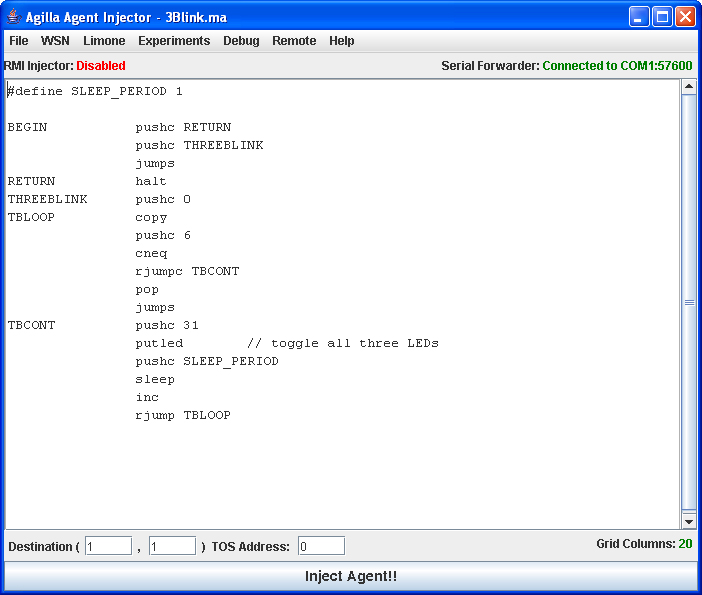
Note that 3Blink.ma is automatically loaded. This is because 3Blink.ma is specified as the default agent within the agilla.properties file. Of course, if you customized your agilla.properties file, it will display whatever agent you specified.
// This agent blink all three LEDs, migrates to mote 1, and
// then blinks all three LEDs again.
//
// It should be injected onto the mote that is directly
// attached to the programming board.
//
// Author: Chien-Liang Fok


#define SLEEP_PERIOD 10

BEGIN		pushc 31
        	putled        // toggle all three LEDs
        	pushc SLEEP_PERIOD
        	sleep
        	pushc 31
        	putled        // toggle all three LEDs
        	pushc 1
        	smove         // strong move to mote 1
        	pushc 31
        	putled        // toggle all three LEDs
        	pushc SLEEP_PERIOD
        	sleep
        	pushc 31
        	putled        // toggle all three LEDs
        	halt
Inject this agent onto the mote that is attached to the programming board and observe the LEDs in your network. Assuming Mote 0 is attached to the programming board, you should see Mote 0's LEDs blink once, then the LEDs on mote 1 blink once. This demonstrates how an agent can migrate onto a remote node.
// This agent blinks the LED three times on the mote that is
// attached to the base station, then migrates onto mote 1.
// Once it arrives at mote 1, it blinks its LEDs again three
// times.
//
// Author: Chien-Liang Fok


#define SLEEP_PERIOD 1

BEGIN			pushc RETURN1
		    	pushc THREEBLINK
				jumps             // blink LEDs three times
RETURN1		pushc 1
				smove             // strong move to mote 1
				pushc RETURN2
				pushc THREEBLINK
				jumps             // blink LEDs three times
RETURN2		halt
THREEBLINK  	pushc 0
TBLOOP  		copy
        		pushc 6
        		cneq
        		rjumpc TBCONT
        		pop
        		jumps
TBCONT  		pushc 31
        		putled        // toggle all three LEDs
        		pushc SLEEP_PERIOD
        		sleep
        		inc
        		rjump TBLOOP
Inject this agent onto the mote that is attached to your programming board. Observe how the agent blinks the LEDs three times, migrates onto mote 1, and then blinks all three LEDs three times again.